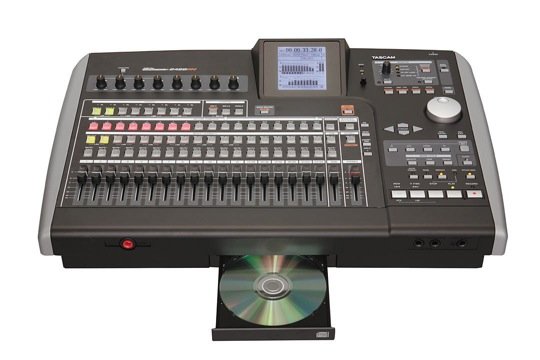
Tascam has announced an update for its 24-track / 24-bit workstation. The updated model boasts a new look and new mastering effects along with the previous model’s eight microphone inputs, seven effects processors, and 80GB hard drive.
Other features include:
- Eight microphone inputs – four with XLR and phantom power, can be assigned to any track for recording large ensembles.
- Reverb effect, multi effect with guitar amp simulation, and up to 9 compressors are also included.Tascam has announced an update for its 24-track / 24-bit workstation. The updated model boasts a new look and new mastering effects along with the previous model’s eight microphone inputs, seven effects processors, and 80GB hard drive.
- New mastering effects includes multi-band EQ, compression and limiting.
- CD burner.
- USB 2.0 jack
See Tascam for more info.
I’m on my second project with my 2488neo and I love
it so far except for after setting an out point and
doing my stereo mixdown. The unit won’t let me go into
the mastering section. The screen says “Master Track is too short. Use MIXDOWN to correct it”. I set my out point and the song is 4 minutes long. What do I do? Anyone?
Once you set your out point and get into the mixdown screen, make sure you are recording your master during mixdown (press play and record). I had the same problem. If you only press play during mixdown, you can still mix your song, but it won’t be recording. Therefore, you don’t have a recorded song to master.
WORD UP TONY A. I HAVE THE SAME SITUATION THAT YOU HAVE MY DUDE…
How do I set my out point? I am using tascam 2488 neo. Very knew at this.HELP!
my probl is i like to just record a 2 min song and the burn it on a cd it wont let me .. i have the tascam 2488 neo….. i hit the mastering switch and it tells me it to short Help please how to i make a 2 min song the mix it and burn it to cd .
After you record all of your tracks to a master NEO just press MIXDOWN/MATERING mk11 (menu) premastering. record and play and record to a master track to master your track ONLY NEO OWNERS press shift+master and you can set compresion eq and what ever you want to the whole signal as it is now 1 track hope this helps
TO SET OUT POINT GO TO THE PORTIAN OF THE SONG WHERE YOU WISH TO END SAMPLE 00 03 56 05 NEO OWNERS PRESS LOCATE+OUT
if you cant get your mastering tools to take effect on 2488 neo its because after mixdown and you have a recorded master track you apply the mastering tools and then you have to record play agian to record track along with the new mastering tools. after you record the mastering tools the file automaticaly overwrites and from there you can export master from menu>wave in/out>export master good luck
I hate the fact that you cannot burn a CD of a recording until you PRE-MASTER the ENTIRE track. I have many bands that would like a room recording of their rehearsal sessions but if I record a 70 minute session that means I need to PRE-MASTER 70 minutes after they are done making it impossible to give them a CD at the end of their 2 hr session, unless we record them in the first 70 minutes and they wait 15-20 minutes after for me to oremaster and burn CDs. Since this is a room recording and not a TRACK recording there really is no mixing involved in my process, just setting a level so having to wait 70 minutes for the track to in a sense, duplicate itself, is really a pain in the butt. Why can’t we just burn a CD of the session without premastering? would it be that much of a burden for Tascam to add this as a feature? It is really a shame.
Recording neophyte here…have a Tascan 2488neo…finally fgured outhow to make a basic multi track recording. Next journey is into effects. Manual talks of “insert effects” and “mixdown effects.” Are “insert effects” those effects one asignes to a track via an input channel and “mixdown effects” the ones added to a song during the mixdown proces?
Manual also talks about MICX4 and MICX5 EFFECTS. Huh? Help!
How do I transfer my mixed song to my computer.
I have Tascam 2488 Neo, just bought it and recorded 14 channels. When I hit the master mix, it saids your master tracks is too short… How do I go from here to finish up my songs.. I need technical assistant. Please help me
Once you set your OUT go to the beginning of the song and set your IN. now you can hit the mix button. The tascam now knows the length of the song you want to mix.
Does anyone know how to take the effects off a track before it’s mixed? Even when I erase the track and re-record onto it, the effects is still there. Anyone know how to get it off?
Thanks
David
All you have to do is hold your track button down and then press your effect button. It should go off.
I have a tascam neo and I have beats on a cd I want to put the beats on the tascam to rap over them but don’t know how. Does the cd tray load it or do I need to do it through the USB connection
I had the same issue. To sbe the master track you must first
Set out point .
Then mixdown the song. There is where the error is occurring. You must HOLD down record them press play. That will save the master allowing you to master the song . It doesn’t tell you this I. The manual. I hope this helps
how do i erase the master tracks?
You can record over them but it is not a good idea, because there are shadow tracks left on the hard drive that will degrade your overwrites. Better to go back to your basic tracts and rename them under a new song or use same name with a tag “rev”.
How do I cut off the first 30 seconds of a recording. I’ve set the in and out points. The out point works during mixdown but I can not get it start recording from the in point during mixdown or mastering.